

Cloudflare R2 is fully S3-compatible, so you connect it by creating an R2 bucket, generating an R2 API token (Access Key / Secret), and using the R2 S3 endpoint.
Step 1 – Create an R2 bucket
- In the Cloudflare dashboard, go to R2 → Object Storage.
- Click Create bucket, choose a bucket name (for example
syne-r2-data), and finish the wizard. - Keep the bucket private by default; do not enable public access unless you explicitly need it.
Step 2 – Generate S3 API credentials (Access Key / Secret)
R2 uses API tokens that map to S3-compatible Access Key ID and Secret Access Key values.Create an R2 API token
Create an R2 API token
- In the Cloudflare dashboard, go to R2 → Object Storage → Manage R2 API Tokens.
- Click Create API Token and choose a template that grants access only to the buckets Syne should use (least privilege).
- After creation, Cloudflare will show you:
- Access Key ID
- Secret Access Key
These are displayed once; copy and store them securely.
Find the R2 S3 endpoint
Find the R2 S3 endpoint
- In R2 → Object Storage, copy your Account ID from the overview.
- Open your bucket → Settings → S3 API.
- Copy the endpoint URL. It typically looks like:
https://<ACCOUNT_ID>.r2.cloudflarestorage.com
This is the value for the Endpoint field in Syne. - When a region is required, you can use
autoorAPAC, which R2 aliases to its automatic region for S3 compatibility.
Step 3 – Fill out the Syne storage form (R2)
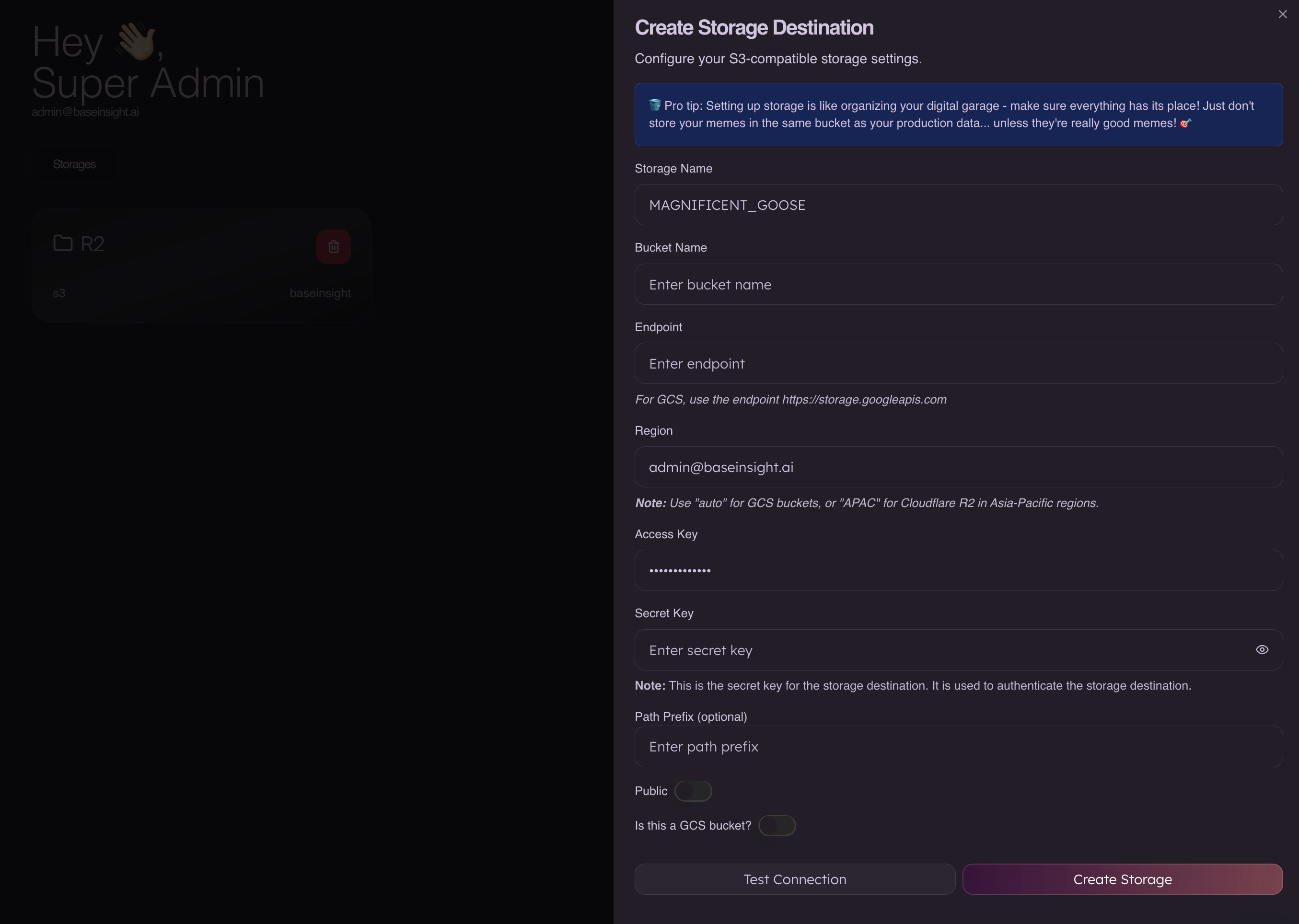
- Storage Name
- Any label, for example
R2_BACKUPS.
- Any label, for example
- Bucket Name
- Your R2 bucket name, e.g.
syne-r2-data.
- Your R2 bucket name, e.g.
- Endpoint
- The R2 S3 endpoint:
https://<ACCOUNT_ID>.r2.cloudflarestorage.com.
- The R2 S3 endpoint:
- Region
- Use
autoorAPAC(recommended for R2).
- Use
- Access Key
- The Access Key ID from your R2 API token.
- Secret Key
- The Secret Access Key from the same token.
- Path Prefix (optional)
- Optional folder-like prefix, e.g.
syne/.
- Optional folder-like prefix, e.g.
- Public
- Keep off so objects remain private; manage access through Cloudflare permissions instead.