

Step 1 – Create an S3 bucket
- In the AWS console, go to S3 → Buckets → Create bucket.
- Choose:
- Bucket name: For example
syne-s3-data. - AWS Region: For example
us-east-1.
- Bucket name: For example
- Block all public access unless you explicitly need public objects; Syne can work with private buckets.
Step 2 – Create an IAM user and access keys
Create an IAM user dedicated to Syne and grant it least-privilege access to the bucket.Create IAM user and policy
Create IAM user and policy
- Open the IAM console → Users → Create user.
- Name the user (for example
syne-storage), and choose Access key – Programmatic access as the credential type (varies slightly in new UI). - Attach a policy that gives access to your bucket only. You can:
- Use AWS managed policies like AmazonS3ReadOnlyAccess (for read-only) or AmazonS3FullAccess (for testing), or
- Create a custom policy that limits access to
arn:aws:s3:::syne-s3-dataandarn:aws:s3:::syne-s3-data/*.
Generate Access Key ID and Secret Access Key
Generate Access Key ID and Secret Access Key
- After creating the user, open the user → Security credentials → Access keys.
- Click Create access key, choose the use case Other, and finish the wizard.
- Copy:
- Access key ID – to use as Access Key in Syne.
- Secret access key – to use as Secret Key in Syne.
These are shown only once; download the CSV or store them securely.
Step 3 – Fill out the Syne storage form (S3)
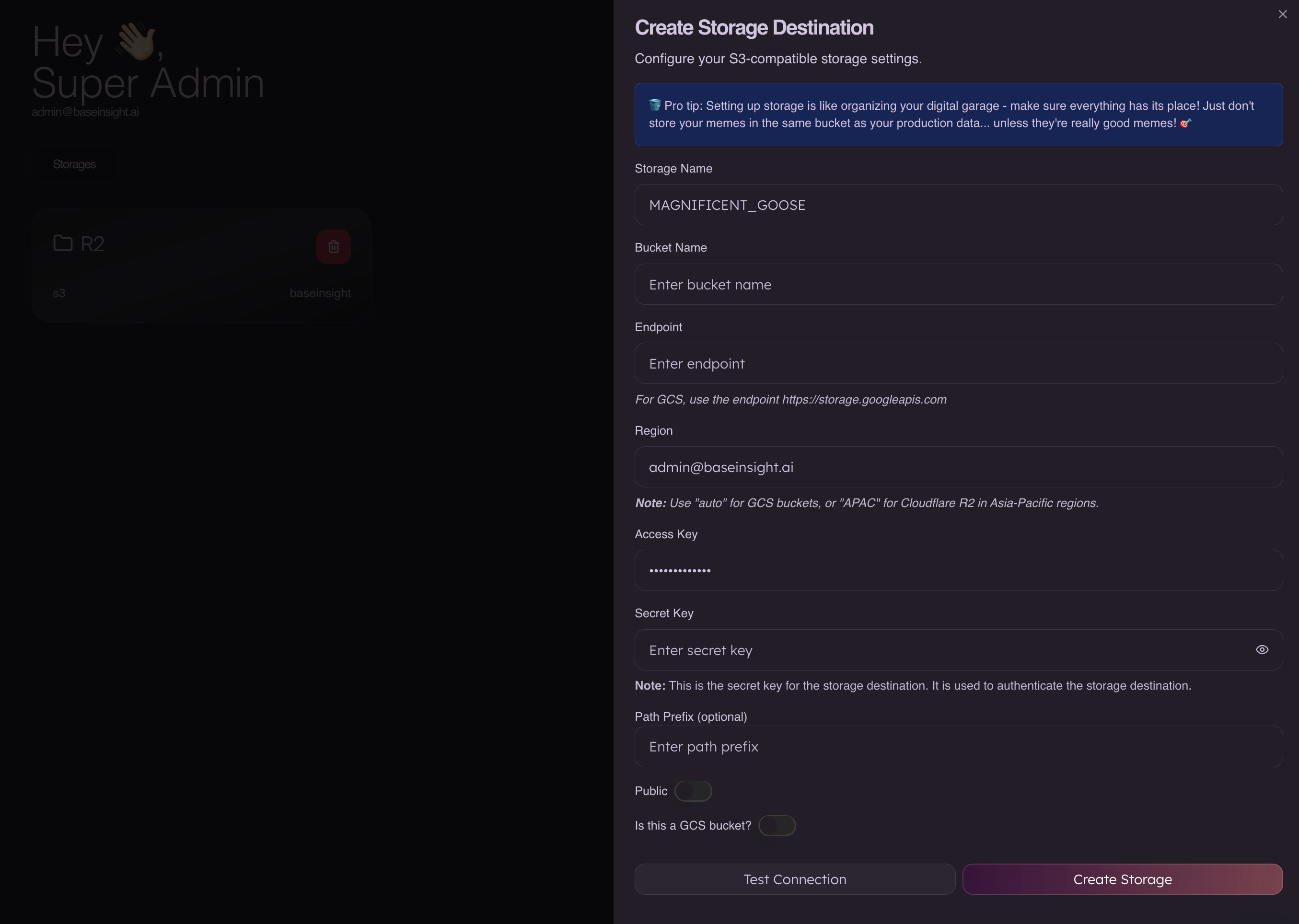
- Storage Name
- Any label, for example
AWS_S3_PRIMARY.
- Any label, for example
- Bucket Name
- Your S3 bucket name, e.g.
syne-s3-data.
- Your S3 bucket name, e.g.
- Endpoint
- Leave blank to let the SDK use the default S3 endpoint for the chosen region, or explicitly set
https://s3.<region>.amazonaws.com(for examplehttps://s3.us-east-1.amazonaws.com).
- Leave blank to let the SDK use the default S3 endpoint for the chosen region, or explicitly set
- Region
- Your bucket’s AWS region, e.g.
us-east-1.
- Your bucket’s AWS region, e.g.
- Access Key
- The IAM user’s Access key ID.
- Secret Key
- The IAM user’s Secret access key.
- Path Prefix (optional)
- Optional prefix like
syne/inside the bucket.
- Optional prefix like
- Public
- Keep off by default; Syne does not require public buckets. Control access via IAM and S3 bucket policies.
Security best practices
- Use dedicated credentials (service account / IAM user / R2 token) per environment (dev, staging, prod).
- Grant only the permissions Syne needs (typically list, read, and write for a single bucket).
- Rotate access keys periodically and remove unused keys or tokens.